![[쿠버네티스 어나더 클래스 (지상편) - Sprint 2] 15. ArgoCD 빠르게 레벨업-3](https://img1.daumcdn.net/thumb/R750x0/?scode=mtistory2&fname=https%3A%2F%2Fblog.kakaocdn.net%2Fdna%2FbRjAth%2FbtsOJOQda0g%2FAAAAAAAAAAAAAAAAAAAAAK_zYHrK_prYA1wuAfsZZ5CzI4pfVVsRDniHo_nMpdDy%2Fimg.png%3Fcredential%3DyqXZFxpELC7KVnFOS48ylbz2pIh7yKj8%26expires%3D1769871599%26allow_ip%3D%26allow_referer%3D%26signature%3D%252Fq81PgUYFWRFRW7G7E4tNJ%252BvKik%253D)

* 본 게시물은 쿠버네티스 어나더 클래스 (지상편) - Sprint 1, 2 강의와 강의 자료를 바탕으로 작성되었습니다.
Argo Rollouts를 이용한 배포
1. Argo CD와 별개로 사용 가능
(Argo CD를 함께 사용하면, Argo CD 대시보드에 promote 할 수 있는 버튼이 하나 더 생기는 것이 끝임)
2. Blue/Green과 Canary 배포를 제공
Argo Rollouts 설치
(이전에 설정해둔 Jenkins Pipeline을 이용하여 설치 진행)

기본 설정
controller:
  # 기본적으로 replicas가 2로 설정되어 있는데,
  # 2개까지는 필요가 없어서 1로 설정
  replicas: 1

dashboard:
  # Rollouts에서 제공하는 dashboard는 enabled 설정을 하지 않으면, 만들어지지 않기 때문에 true로 설정
  enabled: true
  service:
    type: NodePort
    portName: dashboard
    port: 3100
    targetPort: 3100
    nodePort: 30003
설치 확인

Rollouts CLI 설치
curl -LO https://github.com/argoproj/argo-rollouts/releases/download/v1.6.4/kubectl-argo-rollouts-linux-amd64
chmod +x ./kubectl-argo-rollouts-linux-amd64
mv ./kubectl-argo-rollouts-linux-amd64 /usr/local/bin/kubectl-argo-rollouts

# 설치 확인
kubectl argo rollouts version
Blue/Green 배포 Deployment와 Rollout의 차이
1. Deployment (Blue/Green)

- v2를 배포하고 Pod가 생성되면, Service를 새로 만들어 v2에만 연결하여 테스트를 진행
- 테스트가 완료되면, 기존의 Service의 Selector가 v2 Pod를 가리키도록 만들고 v1과 관련된 Resources는 제거
2. Rollout (Blue/Green)
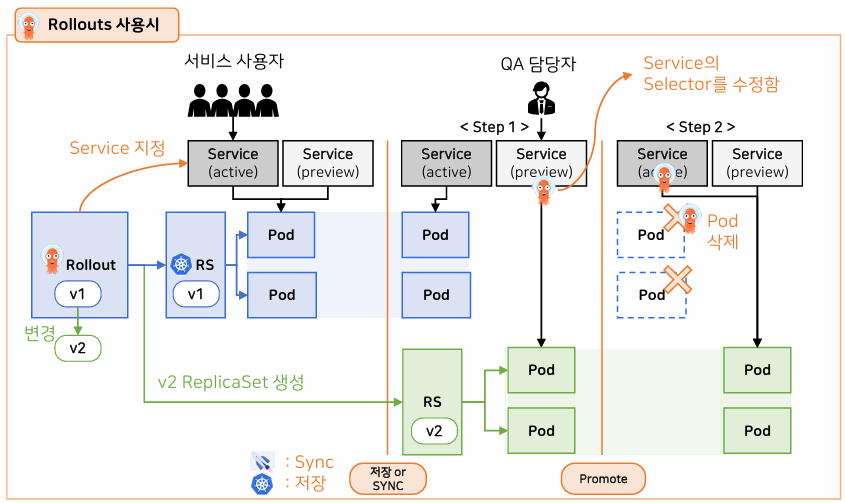
1. Rollout Controller가 Deployment의 역할을 대신함
# rollout.yaml의 내용
apiVersion: argoproj.io/v1alpha1
kind: Rollout
metadata:
  name: api-tester-2233
  labels:
    part-of: k8s-anotherclass
     ...
spec:
  replicas: 2
  strategy:
    blueGreen:
	    # active/preview Service name을 지정
      activeService: api-tester-2233-active
      previewService: api-tester-2233-preview
      # true: promote 없이 Green Pod가 생성되면, 트래픽을 바로 Green으로 돌리고 Blue를 삭제함
      autoPromotionEnabled: false
  ...
  template:
    metadata:
      labels:
        part-of: k8s-anotherclass
        component: backend-server
        name: api-tester
        instance: api-tester-2234
        version: 1.0.0
Rollout에서 blueGreen 속성
previewService: 업그레이드 중간에 새로 만들어지는 ReplicaSet의 Pod에 먼저 연결되는 서비스
activeService: 주 서비스 (업그레이드 시, 트래픽은 Blue에서 Green으로 변경)
autoPromotionEnabled: 새 ReplicaSet이 활성화되면, 바로 트래픽을 전환
(자동 업그레이드 -> default: true)
주의!
트래픽이 많을 때, 급한 배포가 아닌 경우에는 Blue/Green 배포를 지양해야 함
autoPromotionEnabled는 주로, 새벽 시간에 배포 트리거를 걸어두기 위해 사용됨
(새벽 시간에는 과도한 트래픽 유입으로 인한 문제 발생 가능성이 낮기 때문)
Rollout은 CRD(Custom Resource Definition)으로, CRD는 Golang으로 해당 리소스가 어떻게 동작할지 구현되어야 함
(Rollout은 그런 것들이 모두 구현되어 있는 상태라, 다른 Resources 간의 연결이 원활)
예로, HPA와 Rollout은 아래와 같이 연결할 수 있다.
# HPA와 Rollout 연결 예시)
apiVersion: autoscaling/v1
kind: HorizontalPodAutoscaler
metadata:
  name: api-tester-2233
spec:
  maxReplicas: 4
  minReplicas: 2
  scaleTargetRef:
    apiVersion: argoproj.io/v1alpha1
    kind: Rollout
    name: api-tester-2233
  targetCPUUtilizationPercentage: 80
2. Rollout은 Service를 2개(active, preview)를 가짐
- activeService: 실제 서비스 이용자가 들어올 수 있는 Service
- previewService: 업그레이드 중 v2 버전으로만 들어갈 수 있는 Service
2개의 서비스는 아래처럼 구성되며, 평소에는 같은 버전의 Pod를 가리키고 있다가 업그레이드가 진행되면 previewService는 v2 Pods를 가리키게 됨
# Service 예제) - active와 preview 2개 필요
apiVersion: v1
kind: Service
metadata:
  name: api-tester-2233-active
  labels:
    part-of: k8s-anotherclass
    ...
spec:
  selector:
    part-of: k8s-anotherclass
    component: backend-server
    name: api-tester
    instance: api-tester-2233
  ports:
    - port: 80
      targetPort: http
      nodePort: 32233
  type: NodePort
3. Green 버전 적용
previewService를 통해 테스트가 완료되면, promote 명령을 내려 activeService의 selector가 Green을 가리키게 하고 v1과 관련된 Resources를 제거할 수 있다.
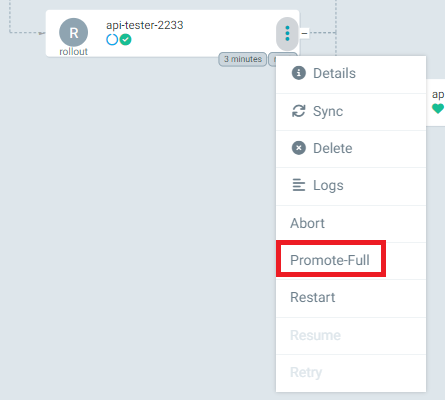

* Argo Rollouts dashboard는 `http://192.168.56.30:{port}/rollouts/{namespace}`를 통해 접속해야 함
* Promote와 PromoteFull의 차이는 Step을 하나만 진행할 지와 모든 Step을 진행할 지의 차이
Canary 배포 Deployment와 Rollout의 차이
1. Deployment (Canary)

- Ingress와 Nginx(Ingress Controller)가 필요
- 사용자는 Ingress Controller를 통해 들어오고, Nginx는 Ingress에 설정된 가중치를 보고 트래픽을 배분
- 덕분에, 2가지 버전에 대한 반응을 볼 수 있고, 테스트가 끝나면 v1에 관련되 Resources를 모두 지움
(Nginx는 별도로 설치해줘야 하는 Add-on이고, 기본 k8s Resources만으로는 Canary배포를 구현할 수 없음)
2. Rollout (Canary)

Canary 배포 2가지 방식
Rollout만 사용해서 Canary 배포 구현할 수 있지만,
Nginx나 Istio 같은 Add-on을 함께 사용해야 섬세한 트래픽 조절이 가능한 것은 Deployment를 사용할 때와 같음
1. Canary 배포 전략을 설정한 Rollout을 만듦
apiVersion: argoproj.io/v1alpha1
kind: Rollout
metadata:
  name: api-tester-2234
  labels:
    part-of: k8s-anotherclass
    ...
spec:
  replicas: 2
  strategy:
    canary:
      steps:
        - setWeight: 33
        - pause: {}
        - setWeight: 66
        - pause: { duration: 2m }
  selector:
    matchLabels:
      ...  // (이하 Deployment Spec과 상동)
Canary 배포는 Blue/Green과 다르게, Service가 하나만 존재해, 따로 나눠주지 않음
2. Rollouts CLI로 배포
# Rollouts CLI를 이용한 자원 조회
kubectl argo rollouts get rollout api-tester-2233 -n anotherclass-223 -w
# 아래 명령어를 이용해 CLI로 배포를 시작할 수 있음
kubectl argo rollouts set image api-tester-2234 api-tester-2234=1pro/api-tester:2.0.0 -n anotherclass-223
배포를 시작하면, Rollout의 Step에 정의된 대로 행동한다.

첫 Step에서는 setWeight가 33으로 전체 Pod의 33%를 Canary Pod가 차지하게 됨. 그리고, pause가 비어있으므로, promote 명령 전까지 계속 대기함 (기존 Pod가 2개였으면, Canary Pod가 1개 생성)
# Rollout CLI를 이용한 prmote
kubectl argo rollouts promote api-tester-2234 -n anotherclass-223
promote 명령 후, Canary Pod가 하나 증가하고 기존 Pod는 하나 제거된다. 그리고, pause에 duration 속성이 '2m'으로 정의되어, promote를 하지않아도 2분이 지나면 남아있는 기존 Pod는 제거된다.
'Tech > Kubernetes(K8s)' 카테고리의 다른 글
| [쿠버네티스 어나더 클래스 (지상편) - Sprint 2] 15. ArgoCD 빠르게 레벨업-2 (0) | 2025.06.18 |
|---|---|
| [쿠버네티스 어나더 클래스 (지상편) - Sprint 2] 15. ArgoCD 빠르게 레벨업-1 (0) | 2025.06.17 |
| [쿠버네티스 어나더 클래스 (지상편) - Sprint 2] 14. Helm과 Kustomize 비교하며 사용-2 (0) | 2025.06.16 |
| [쿠버네티스 어나더 클래스 (지상편) - Sprint 2] 13. Helm과 Kustomize 비교하며 사용-1 (0) | 2025.06.14 |
| [쿠버네티스 어나더 클래스 (지상편) - Sprint 2] 12. Jenkins Pipeline (기초부터 Blue/Green까지 (0) | 2025.06.12 |
잘못된 정보가 있다면 말씀해주세요!
![[쿠버네티스 어나더 클래스 (지상편) - Sprint 2] 15. ArgoCD 빠르게 레벨업-2](https://img1.daumcdn.net/thumb/R750x0/?scode=mtistory2&fname=https%3A%2F%2Fblog.kakaocdn.net%2Fdna%2FcULyBR%2FbtsOEX2fozq%2FAAAAAAAAAAAAAAAAAAAAAGZZcrzNE_MGTi5MaKZFaMbRUA6XIEpAzMeLyUZdp4WX%2Fimg.png%3Fcredential%3DyqXZFxpELC7KVnFOS48ylbz2pIh7yKj8%26expires%3D1769871599%26allow_ip%3D%26allow_referer%3D%26signature%3DiM1C0Acjz9SoK2hULdQ9p1tydR0%253D)
![[쿠버네티스 어나더 클래스 (지상편) - Sprint 2] 15. ArgoCD 빠르게 레벨업-1](https://img1.daumcdn.net/thumb/R750x0/?scode=mtistory2&fname=https%3A%2F%2Fblog.kakaocdn.net%2Fdna%2FJp7jC%2FbtsODW20pWb%2FAAAAAAAAAAAAAAAAAAAAABIzflVpkFUGZoTE-sMxwZ-xAfrRwtnkO4AaX_PWYcpC%2Fimg.png%3Fcredential%3DyqXZFxpELC7KVnFOS48ylbz2pIh7yKj8%26expires%3D1769871599%26allow_ip%3D%26allow_referer%3D%26signature%3DGCIOXcaiPvyE03ChTY9uMrK8vQU%253D)
![[쿠버네티스 어나더 클래스 (지상편) - Sprint 2] 14. Helm과 Kustomize 비교하며 사용-2](https://img1.daumcdn.net/thumb/R750x0/?scode=mtistory2&fname=https%3A%2F%2Fblog.kakaocdn.net%2Fdna%2Fn5q4n%2FbtsODnlnGpV%2FAAAAAAAAAAAAAAAAAAAAAEf0ODoJi9qDy7toMnglrLuGWYio00eAPHobRIc2zFMW%2Fimg.png%3Fcredential%3DyqXZFxpELC7KVnFOS48ylbz2pIh7yKj8%26expires%3D1769871599%26allow_ip%3D%26allow_referer%3D%26signature%3D7%252FCyyX%252BJLUVW%252BITZ4F7SssgCoWk%253D)
![[쿠버네티스 어나더 클래스 (지상편) - Sprint 2] 13. Helm과 Kustomize 비교하며 사용-1](https://img1.daumcdn.net/thumb/R750x0/?scode=mtistory2&fname=https%3A%2F%2Fblog.kakaocdn.net%2Fdna%2FlGefJ%2FbtsOA23ng6E%2FAAAAAAAAAAAAAAAAAAAAAK4fh2X9Xq8qxWOXMgrdXCGxG4uLVC30nJXH2nbACA-9%2Fimg.png%3Fcredential%3DyqXZFxpELC7KVnFOS48ylbz2pIh7yKj8%26expires%3D1769871599%26allow_ip%3D%26allow_referer%3D%26signature%3DxUVpQpcRaPAqHNMiMF5sNdGRWdk%253D)